
FFUF (Fuzz Faster U Fool) is a fast and flexible web application fuzzing tool widely used by penetration testers and security researchers. It helps identify hidden directories, files, subdomains, parameters, and other resources that may not be directly accessible through normal website navigation.
During web application security testing, discovering hidden resources is an important step because they may contain sensitive information, administrative interfaces, backup files, or potentially vulnerable application functionality.
The FFUF web application fuzzing tool automates this discovery process by sending multiple HTTP requests with different input values and analyzing the responses.
One of the main advantages of FFUF is its speed and advanced filtering capabilities. It allows testers to filter results based on HTTP status codes, response size, word count, line count, and other response characteristics.
In this article, we will explore some commonly used FFUF commands with practical examples. We have installed Kali Linux 2026.2 as a virtual machine, where the FFUF fuzzing tool is already available.
1. Check FFUF Help Options
Before using FFUF, you can check its help menu to understand the available options and their usage.
Use the following command:
ffuf -h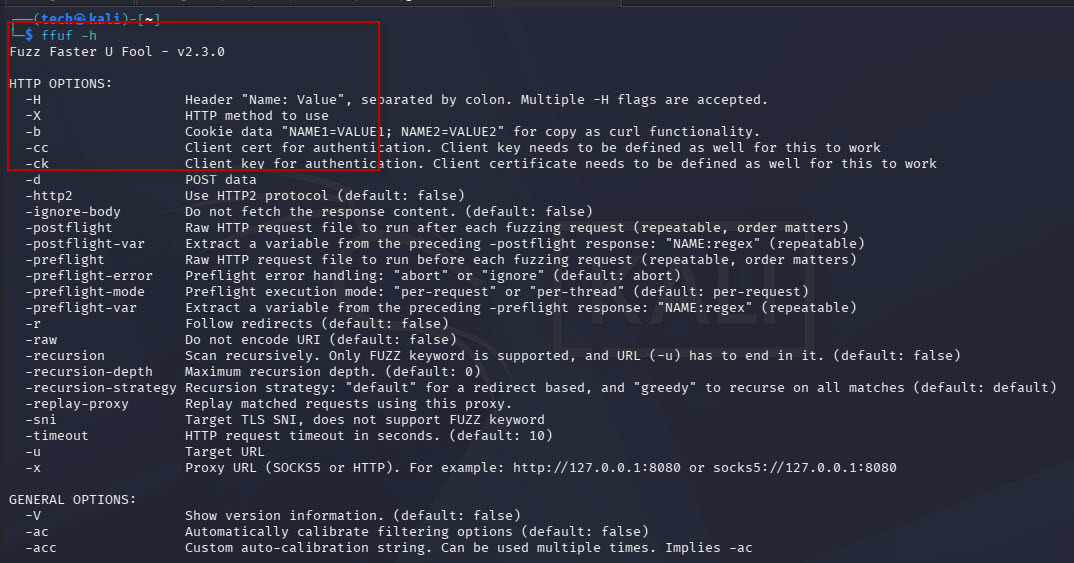
This command displays the available arguments, including options for URLs, wordlists, extensions, filtering, matching, recursion, and output formats.
2. Basic Directory and File Fuzzing
The basic functionality of FFUF is to discover hidden directories and files on a web server using a wordlist.
Use the following command:
ffuf -u http://10.228.12.57/DVWA/FUZZ -w Desktop/samplelist.txt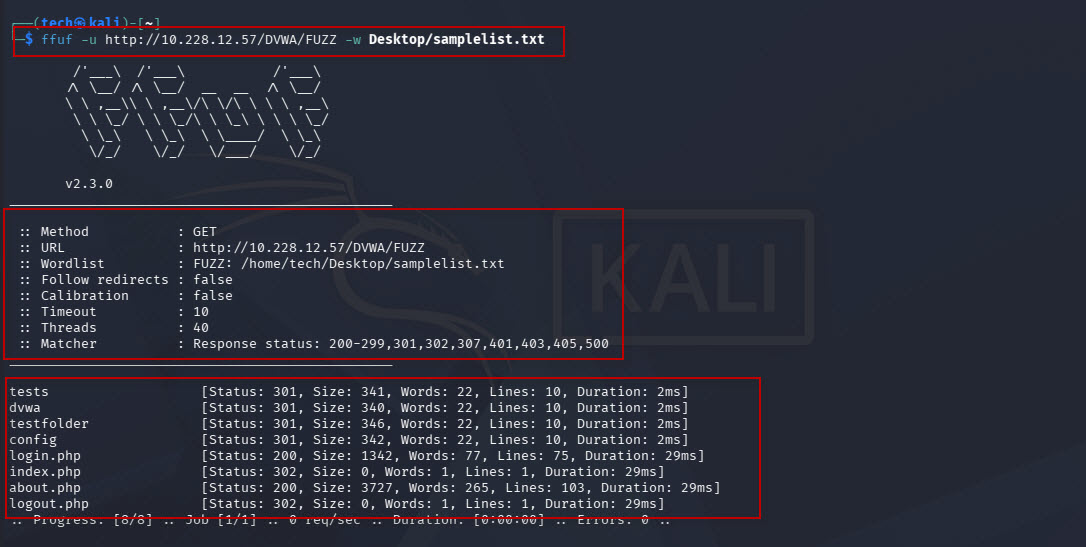
Here:
- -u: Specifies the target URL.
- FUZZ: Defines the location where FFUF will insert each word from the wordlist.
- -w: Specifies the wordlist containing directory or file names to test.
In this example, we are testing the DVWA web application hosted at IP address.
The samplelist.txt file contains a list of keywords that FFUF uses during fuzzing. You can create your own custom wordlist or use the existing wordlists available in Kali Linux under: /usr/share/wordlists/
The output displays the tested fuzzing words along with HTTP status codes, response sizes, word counts, and line counts. These details help identify interesting directories and files.
3. Fuzzing with Multiple Wordlists
FFUF also supports multiple wordlists in a single command. This is useful when you want to test different parts of a URL simultaneously.
ffuf -u http://10.228.12.57/DVWA/FUZZ/FUZZ2 -w Desktop/samplelist.txt:FUZZ -w Desktop/samplelist2.txt:FUZZ2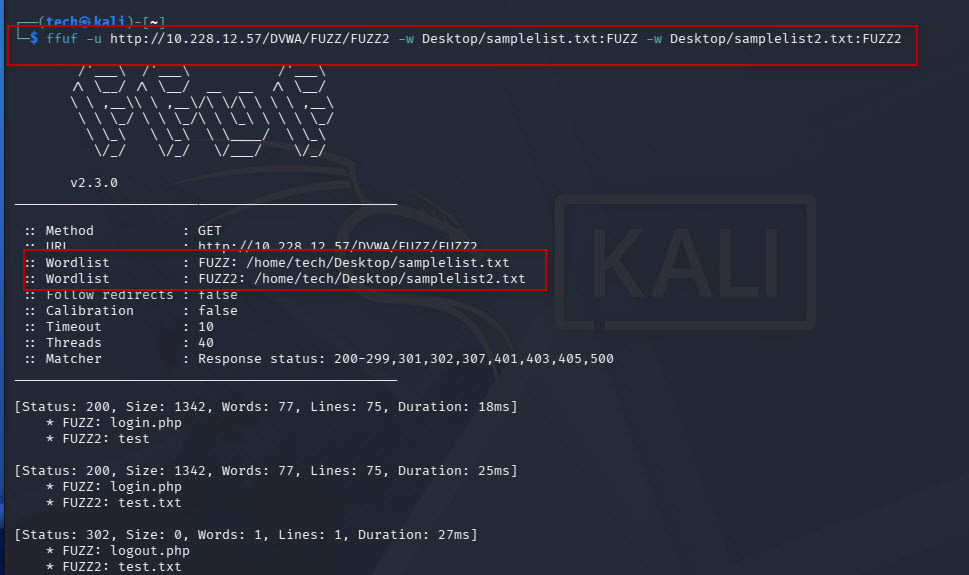
In this command:
- FUZZ: Uses words from the first wordlist.
- FUZZ2: Uses words from the second wordlist.
- Each wordlist is assigned a separate keyword.
This allows you to test different URL combinations during web application fuzzing.
4. Fuzzing with File Extensions
Sometimes, you may want to discover files with specific extensions, such as php, html, txt, or aspx.
Ffuf provides the -e option to append extensions to the words in a wordlist.
ffuf -u http://10.228.12.57/DVWA/FUZZ/ -w Desktop/samplelist_ext.txt -e .php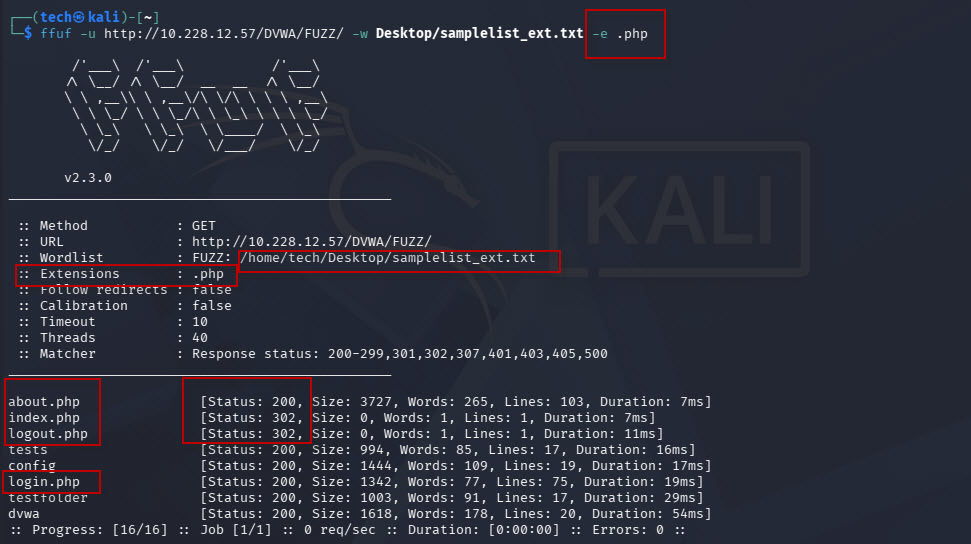
In this example, ffuf tests the words in the wordlist with the .php extension.
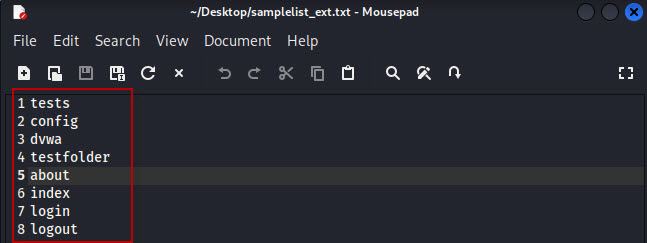
For example, if your wordlist contains about, FFUF will also test about.php.
5. Matching Responses Using Status Codes and Other Values
FFUF provides several matching options to display responses that meet specific conditions.
Match HTTP status code (-mc)
To display only responses with HTTP status code 200, use:
ffuf -u http://10.228.12.57/DVWA/FUZZ/ -w Desktop/samplelist.txt -mc 200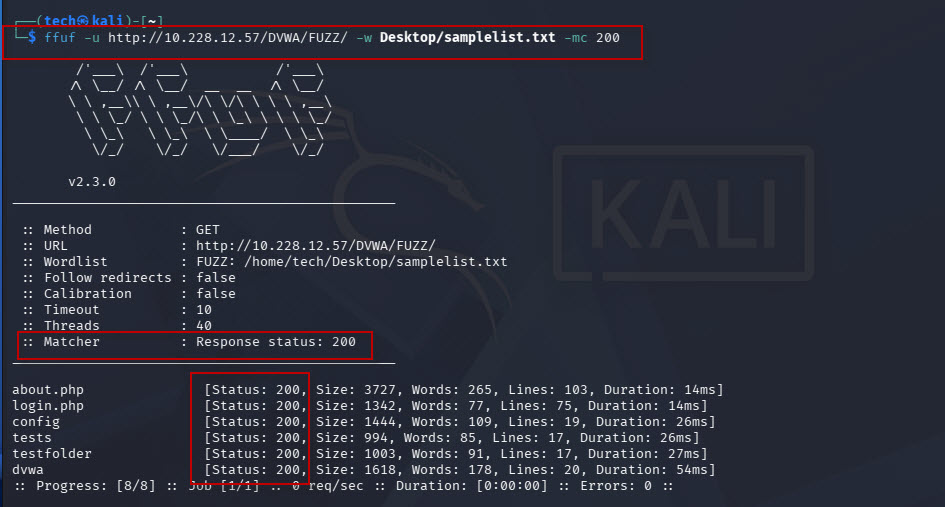
Match lines (-ml)
To match responses containing exactly 17 lines:
ffuf -u http://10.228.12.57/DVWA/FUZZ/ -w Desktop/samplelist.txt -ml 17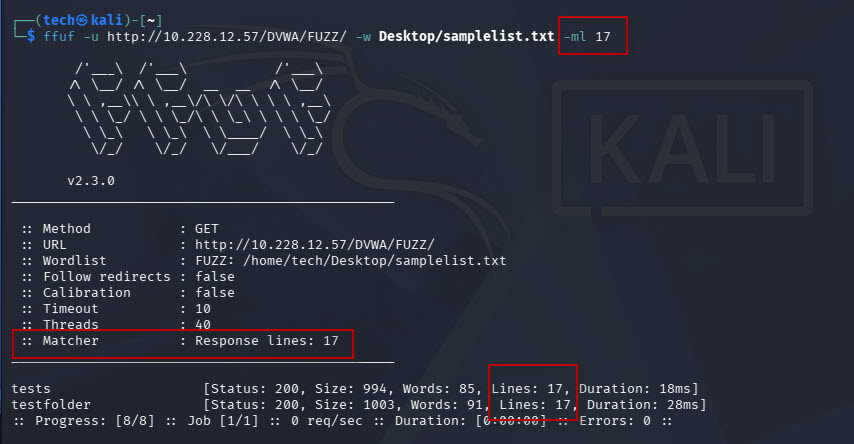
Match words (-mw)
To match responses containing 85 words:
ffuf -u http://10.228.12.57/DVWA/FUZZ/ -w Desktop/samplelist.txt -mw 85Match response size (-ms)
To match responses with a size of 994 bytes:
ffuf -u http://10.228.12.57/DVWA/FUZZ/ -w Desktop/samplelist.txt -ms 994These options help narrow down the results and identify responses that may indicate interesting application resources.
6. Filtering Unwanted Responses
Matching options display responses that meet specific conditions, whereas filtering options exclude responses that you do not want to see.
Filter HTTP status codes (-fc)
For example, to exclude responses with HTTP status code 302:
ffuf -u http://10.228.12.57/DVWA/FUZZ/ -w Desktop/samplelist.txt -fc 302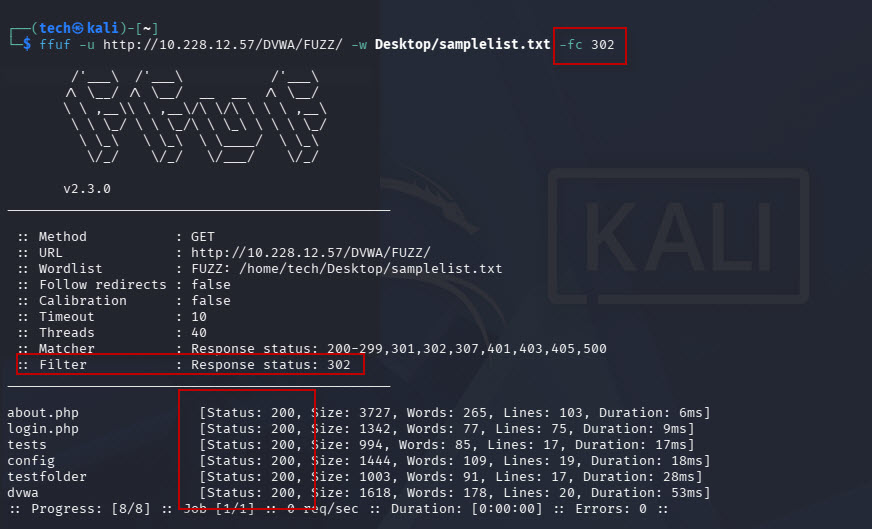
To filter multiple status codes, separate them with commas:
ffuf -u http://10.228.12.57/DVWA/FUZZ/ -w Desktop/samplelist.txt -fc 302,404Filter lines (-fl)
To exclude responses containing 17 lines:
ffuf -u http://10.228.12.57/DVWA/FUZZ/ -w Desktop/samplelist.txt -fl 17Filtering is particularly useful when a web application returns similar responses for invalid URLs, making it easier to identify meaningful results.
7. Other Useful FFUF Options
Apart from matching and filtering, FFUF provides additional options that help control and customize fuzzing activities.
Display output in different colours (-c)
ffuf -u http://10.228.12.57/DVWA/FUZZ/ -w Desktop/samplelist.txt -c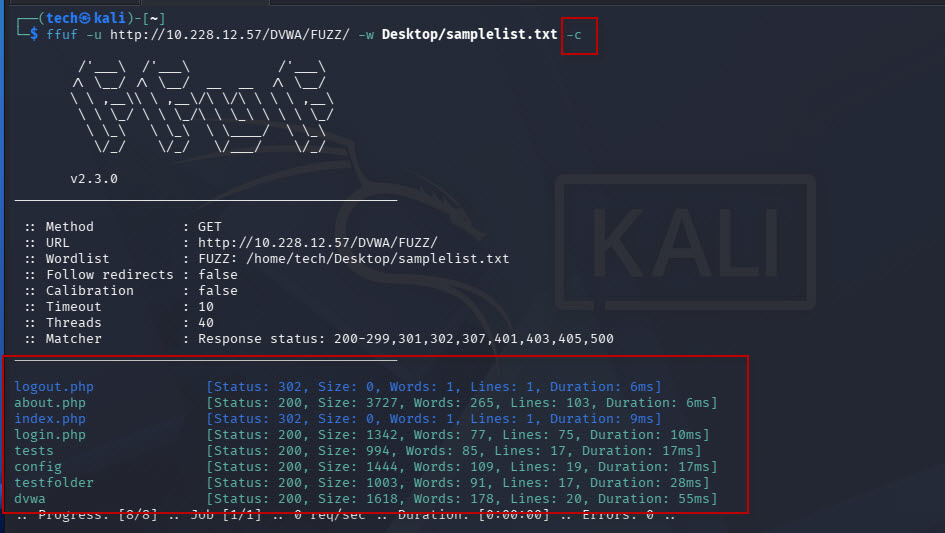
Enable verbose output (-v)
ffuf -u http://10.228.12.57/DVWA/FUZZ/ -w Desktop/samplelist.txt -v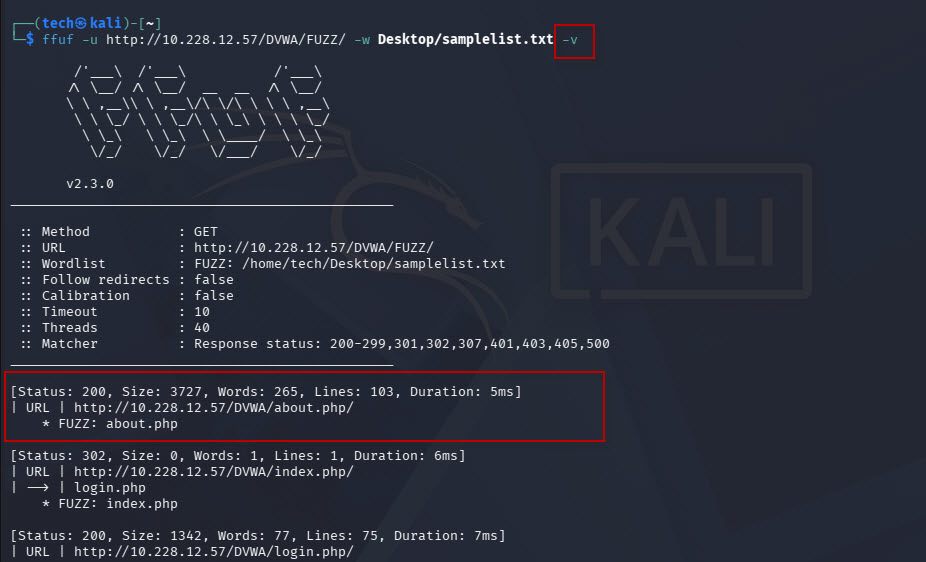
The -v option displays more detailed information about the fuzzing results.
8. Save FFUF Output in Different Formats
FFUF allows you to save scan results for further analysis and documentation.
To save the results in HTML format:
ffuf -u http://10.228.12.57/DVWA/FUZZ/ -w Desktop/samplelist.txt -o Desktop/outputfile.html -of html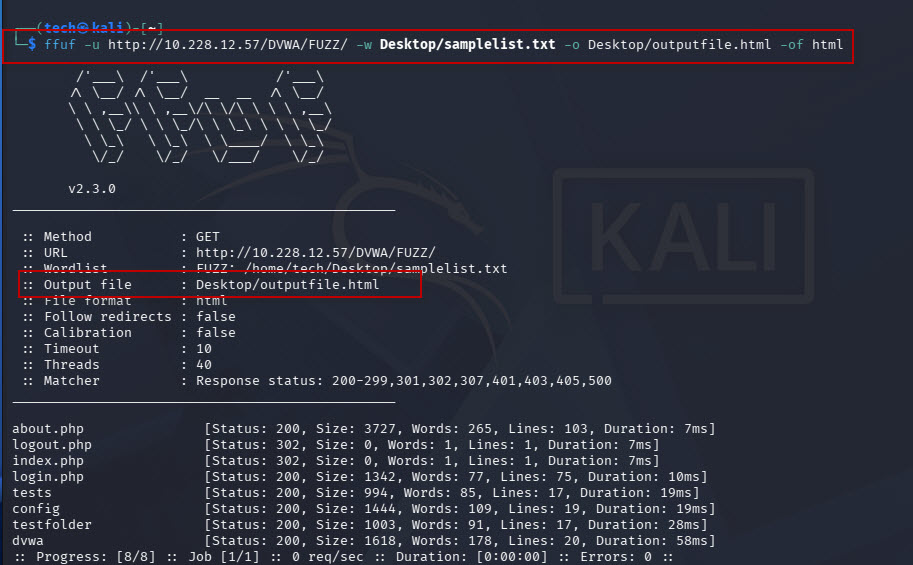
To save the results in CSV format:
ffuf -u http://10.228.12.57/DVWA/FUZZ/ -w Desktop/samplelist.txt -o Desktop/outputfile.csv -of csvYou can also generate output files in all supported formats using a single command:
ffuf -u http://10.228.12.57/DVWA/FUZZ/ -w Desktop/samplelist.txt -o Desktop/outputfile -of all9. Recursive Directory Fuzzing
Sometimes, hidden directories contain additional subdirectories and files. FFUF supports recursive fuzzing to discover resources inside further directory levels.
Use the following command:
ffuf -u http://10.228.12.57/DVWA/FUZZ -w Desktop/samplelist.txt -recursion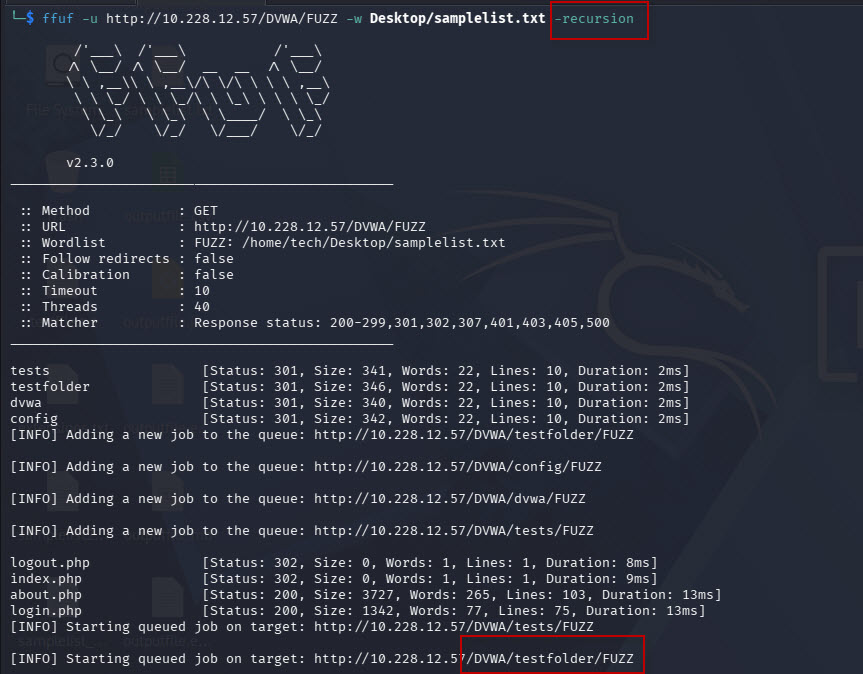
With recursion enabled, FFUF can continue fuzzing discovered directories instead of limiting the scan to the initial directory level.
In this article, we explored commonly used FFUF commands with practical examples using Kali Linux 2026.2 and a DVWA test environment.
By understanding these options, security researchers and penetration testers can use FFUF more effectively during the information gathering and web application security testing phases.