

Port scanning is an important technique in network security used to identify open ports, active hosts, and running services on a target system. It helps network administrators and security professionals understand which services are accessible over a network and identify potential security risks.
During a vulnerability assessment and penetration testing (VAPT) engagement, port scanning is usually one of the initial steps. It helps security testers discover exposed services that may require further security testing.
There are several port scanning tools available for identifying open ports and gathering information about network devices. Some tools provide command-line interfaces, while others offer graphical interfaces that make scanning easier.
In this article, we will explore the top 5 port scanning tools commonly used by network administrators and penetration testers.
1. Nmap (Network Mapper)
Nmap (Network Mapper) is one of the most popular and widely used open-source port scanning tools. It is available for Linux, Windows, and macOS and comes pre-installed in Kali Linux.
Nmap is not limited to identifying open ports. It can also gather additional information about the target system, such as running services, service versions, and operating system details.
Some of its key features include:
- Port Scanning: Identifies open, closed, and filtered ports on a target system.
- Service Version Detection: Identifies services and their running versions.
- OS Detection: Attempts to identify the target operating system.
- Network Discovery: Discovers active hosts on a network.
- Basic Vulnerability Assessment: Supports NSE (Nmap Scripting Engine) scripts for checking various security issues.
Basic Syntax:
nmap <Target IP>Example:
nmap 10.0.0.1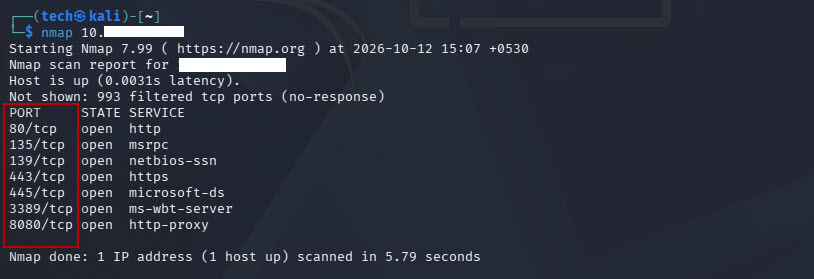
This command performs a basic scan of the target IP address and displays the discovered open ports and associated services.
For more advanced scanning, Nmap provides several options to customize the scan according to testing requirements.
Download: https://nmap.org/download.html
2. Zenmap
Zenmap is the official graphical user interface (GUI) for Nmap. It provides a user-friendly way to perform network and port scanning without requiring users to remember multiple command-line options.
It is particularly useful for beginners who are learning network scanning and want to perform scans through a graphical interface.
To scan a target using Zenmap:
- Open the Zenmap application.
- Enter the target IP address or hostname in the Target textbox.
- Select the required scan profile or enter an Nmap command.
- Click the Scan button.
- Review the scan results to identify open ports and running services.
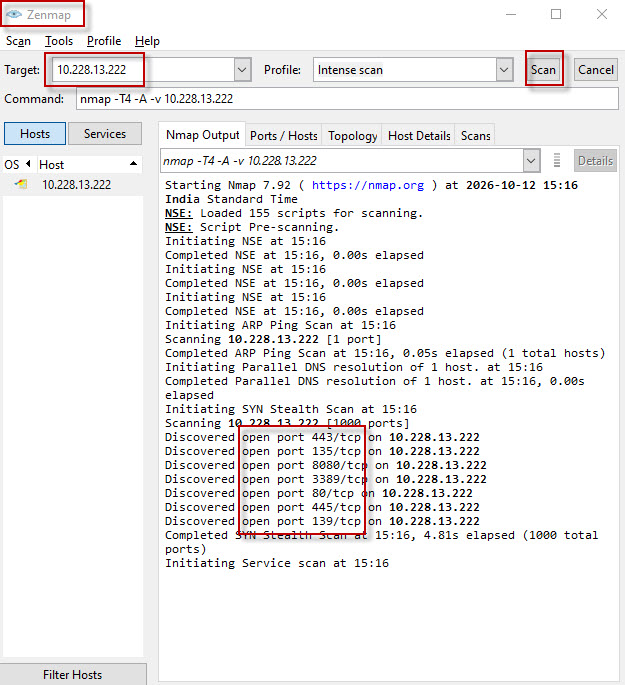
Zenmap also provides different tabs to view scan output, discovered ports, host details, and network topology.
Since Zenmap uses Nmap in the background, it supports many of the same scanning capabilities.
Download: https://nmap.org/download.html#windows
3. Angry IP Scanner
Angry IP Scanner is a free and open-source network scanning tool used to scan IP address ranges and identify active hosts on a network.
It is lightweight, easy to use, and available for Windows, Linux, and macOS.
The tool can collect useful information about discovered hosts, including IP addresses, hostnames, response times, and MAC addresses, depending on the available network information.
Angry IP Scanner can also perform port scanning by configuring the ports you want to check.
How to perform port scanning using Angry IP Scanner:
- Open the Angry IP Scanner application.
- Specify the IP address or IP address range you want to scan.
- Click the Start button to discover active hosts.
- To configure port scanning, navigate to Tools > Preferences > Ports.
- Enter the specific port numbers or port range you want to scan.
- Save the settings and start the scan.
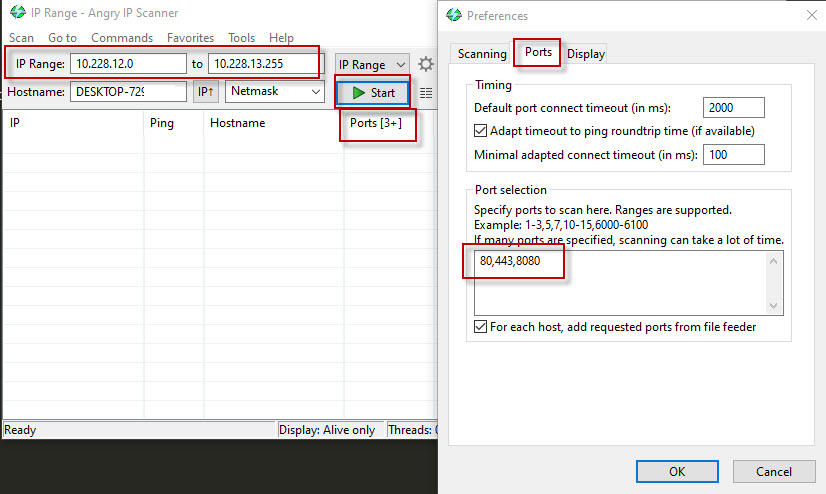
This allows you to identify active systems and check whether selected ports are accessible.
Angry IP Scanner is especially useful when you need to quickly discover live hosts across a local network.
Download: https://angryip.org/download/#windows
4. Masscan
Masscan is a fast, open-source port scanning tool designed to scan large IP address ranges at high speeds. It is often considered one of the fastest port scanners available.
Unlike traditional scanners that are generally used for detailed scans of individual hosts, Masscan is particularly useful when scanning large networks for specific open ports.
Masscan is available in Kali Linux and can also be installed on other Linux distributions and supported operating systems.
Basic Syntax:
sudo masscan <Target IP> -p<Port Range>Example:
sudo masscan 10.228.1.179 -p1-600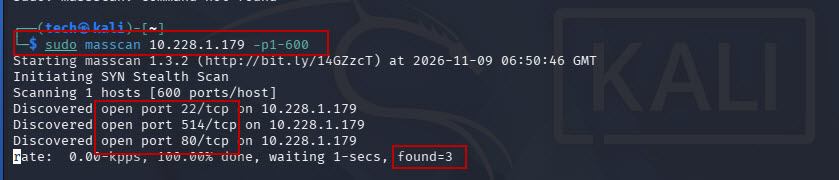
This command scans ports 1 through 600 on the target IP address and reports the ports that respond.
Masscan is useful for:
- Scanning large IP address ranges.
- Quickly identifying exposed network ports.
- Performing initial network reconnaissance.
- Discovering open ports before conducting detailed Nmap scans.
Download: https://github.com/robertdavidgraham/masscan
5. Netcat (NC)
Netcat, commonly abbreviated as NC, is a versatile networking utility used to read and write data across network connections using TCP or UDP.
It provides a simple way to check whether specific ports are accepting connections. It is useful for basic connectivity testing, troubleshooting, and network security assessments.
Netcat is pre-installed in Kali Linux.
Basic Syntax:
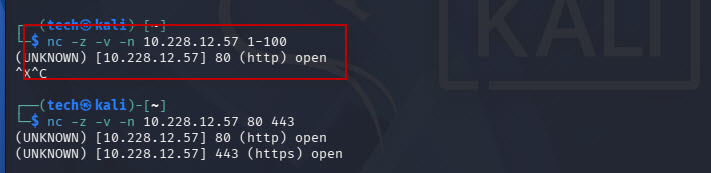
nc -z <IP Address> <Port Range>Example 1: Scan a range of ports
nc -z -v -n 10.228.12.57 1-100This command checks TCP ports 1 through 100 on the target IP address.
The command uses the following options:
- -z: Scans for listening ports without sending application data.
- -v: Enables verbose output to display scan results.
- -n: Disables DNS resolution and uses numerical IP addresses.
Example 2: Scan specific ports
nc -z -v -n 10.228.12.57 80 443This command checks whether ports 80 (HTTP) and 443 (HTTPS) are accepting TCP connections on the target system.
Download: https://sourceforge.net/projects/nc110/
Conclusion
Port scanning is an essential part of network security testing and vulnerability assessment. It helps identify active hosts, exposed ports, and running services that may require further investigation.
All five tools discussed in this article have their own advantages. Nmap is an excellent choice for detailed network scanning, Zenmap makes Nmap easier to use through a graphical interface, Angry IP Scanner is useful for discovering active hosts, Masscan is suitable for high-speed scanning of large networks, and Netcat is helpful for basic port connectivity testing.
The choice of tool depends on your scanning requirements, network size, and level of technical expertise.
Note: Always perform port scanning only on systems and networks you own or have explicit permission to test.