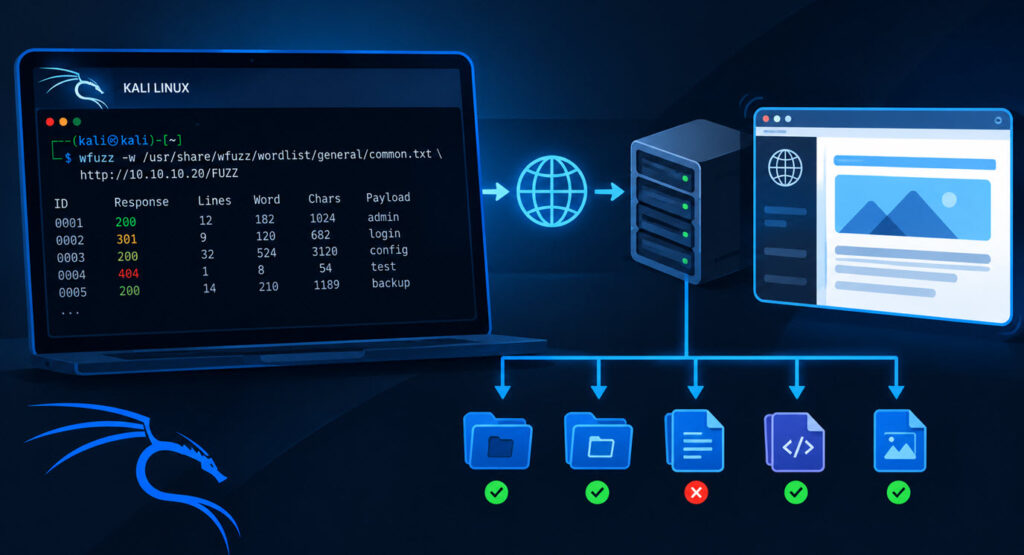
Wfuzz is a powerful web application fuzzing tool used by penetration testers and security researchers to discover hidden directories, files, virtual hosts, parameters, and other resources in web applications. It replaces a specified placeholder in an HTTP request with words or payloads from a wordlist and analyzes the server’s responses.
Wfuzz supports fuzzing in multiple locations, including URLs, cookies, HTTP headers, POST data, and host headers. This makes it useful for web application reconnaissance and security testing.
In this tutorial, you will learn how to use Wfuzz in Kali Linux 2026.2 with practical command examples for web application security testing.
Note: Run these commands only against systems you own or have explicit permission to test. The examples using DVWA are intended for a controlled lab environment.
1. What Is Wfuzz?
Wfuzz is an open-source web application fuzzer that automates the process of sending HTTP requests with different input values. It uses placeholders such as FUZZ and FUZ2Z to identify where wordlist entries should be inserted into a request.
For example, when testing a URL such as http://targetwebsite.com/FUZZ, Wfuzz can try different directory and file names from a wordlist and display the resulting HTTP responses.
Common uses of Wfuzz include:
- Directory and file discovery.
- Web application parameter fuzzing.
- Cookie and HTTP header fuzzing.
- Virtual host discovery.
- POST data and login form testing.
- Identifying interesting HTTP response codes and patterns.
2. How to Access Wfuzz in Kali Linux
Kali Linux provides Wfuzz in its software repositories, and it may already be installed in your Kali Linux 2026.2 environment.
To check whether Wfuzz is available, open a terminal and execute:
wfuzz --version
To view the available commands and options, use:
wfuzz -h

Alternatively:

wfuzz --help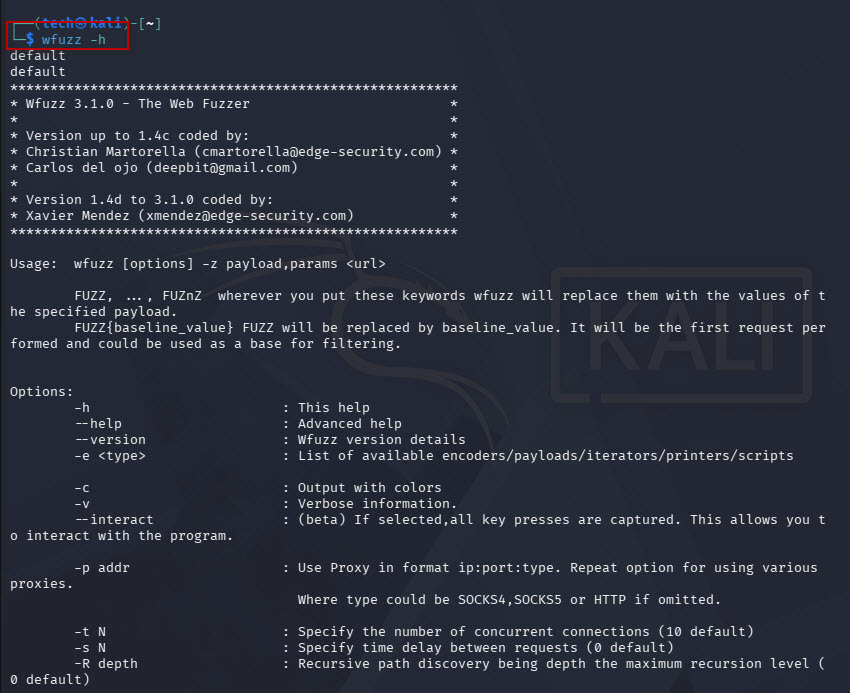
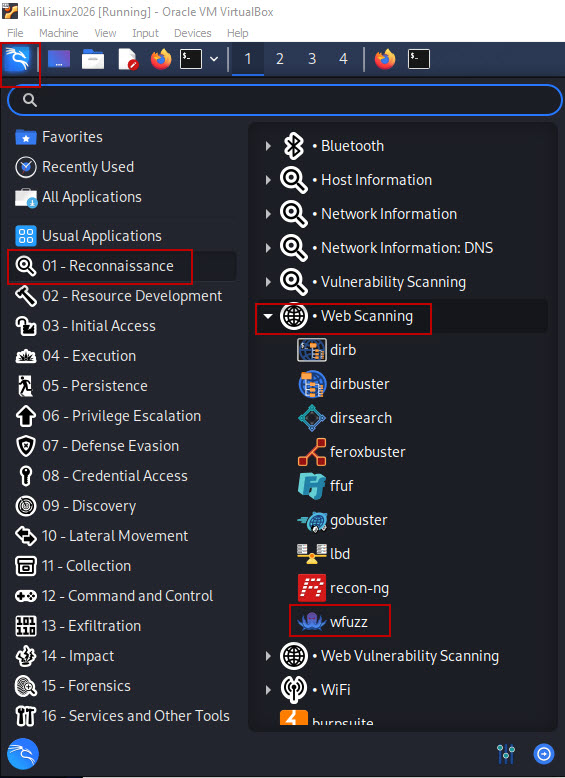
You can also look for Wfuzz in the Kali application menu under:
Applications → Reconnaissance → Web Scanning → Wfuzz
3. Understanding Wfuzz Wordlists
Wfuzz uses wordlists to generate input values for fuzzing. A wordlist contains entries such as directory names, file names, parameter values, or other payloads.
Kali Linux includes several wordlists in different locations. Common directories include:
- /usr/share/wfuzz/wordlist/
- /usr/share/wordlists/
- /usr/share/dirb/wordlists/
For example, the following wordlist contains commonly used directory and file names:
/usr/share/wfuzz/wordlist/general/common.txt
You can also create a custom wordlist according to your testing requirements.
4. Directory and File Discovery Using Wfuzz
Directory and file discovery is one of the most common uses of Wfuzz. It helps identify accessible web resources that are not linked directly from a website’s pages.
Basic syntax
wfuzz -w <wordlist> http://targetwebsite.com/FUZZHere:
- -w specifies the wordlist.
- FUZZ identifies the location where each wordlist entry will be inserted.
- The targetwebsite specifies the web application being tested.
Example
wfuzz -w /usr/share/wfuzz/wordlist/general/common.txt http://10.228.12.57/DVWA/FUZZ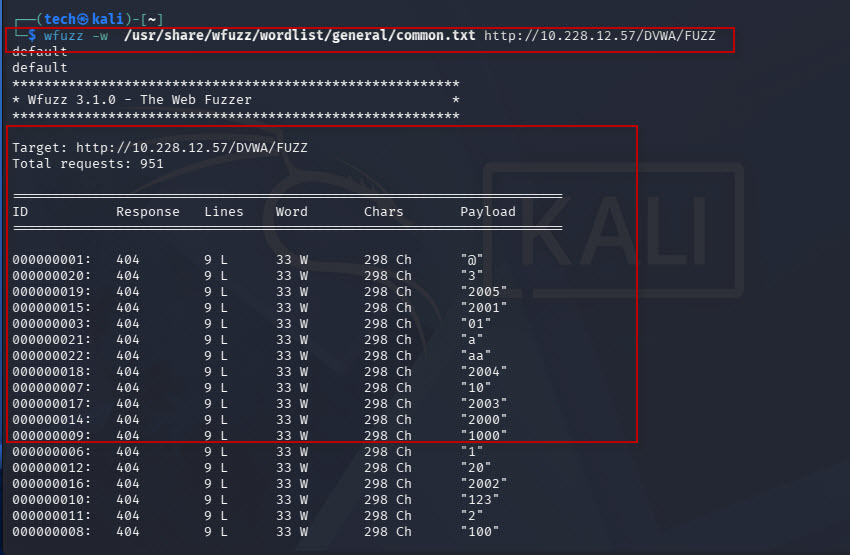
In this example, Wfuzz replaces FUZZ with each entry from common.txt and sends requests to the DVWA application.
For example, it may test paths such as:
- http://10.228.12.57/DVWA/admin
- http://10.228.12.57/DVWA/login
- http://10.228.12.57/DVWA/config
These are illustrative requests, not confirmed findings from the target.
5. Using Multiple Fuzzing Points
Wfuzz allows you to test multiple locations in a single URL by using different placeholders and wordlists.
Syntax
wfuzz -w <wordlist1> -w <wordlist2> http://targetwebsite.com/FUZZ/FUZ2ZExample
wfuzz -w /usr/share/wfuzz/wordlist/general/common.txt -w /usr/share/dirb/wordlists/common.txt http://10.228.12.57/DVWA/FUZZ/FUZ2Z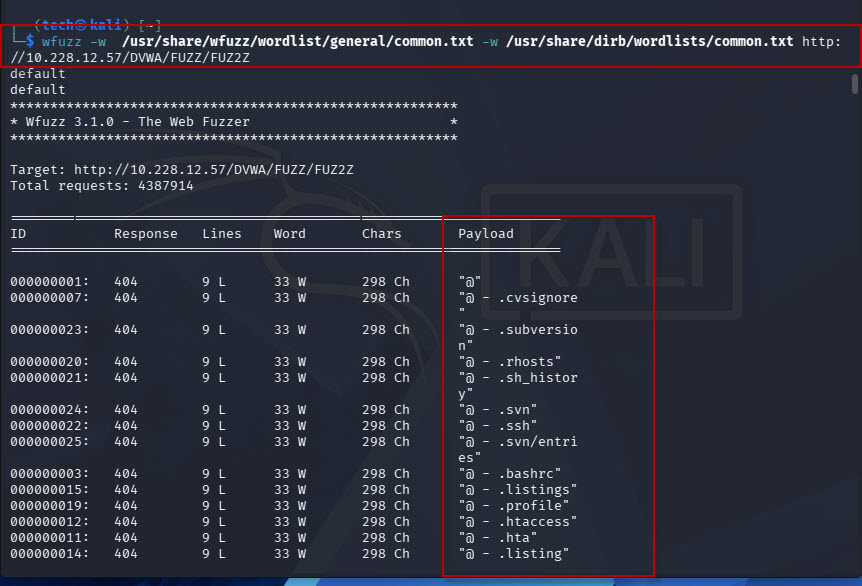
In this example:
- FUZZ represents the first fuzzing location.
- FUZ2Z represents the second fuzzing location.
- The first wordlist supplies values for FUZZ.
- The second wordlist supplies values for FUZ2Z.
Because multiple wordlists can generate many requests, use smaller, targeted lists when possible to reduce testing time and server load.
6. Cookie Fuzzing
Cookies often contain session identifiers, application preferences, and other values used by web applications. Wfuzz can replace a cookie value with entries from a wordlist to test how an application responds to different inputs.
Syntax
wfuzz -w <wordlist> -b "session=FUZZ" http://targetwebsite.com/Example
wfuzz -w /usr/share/wfuzz/wordlist/general/common.txt -b "PHPSESSID=FUZZ" http://10.228.12.57/DVWA/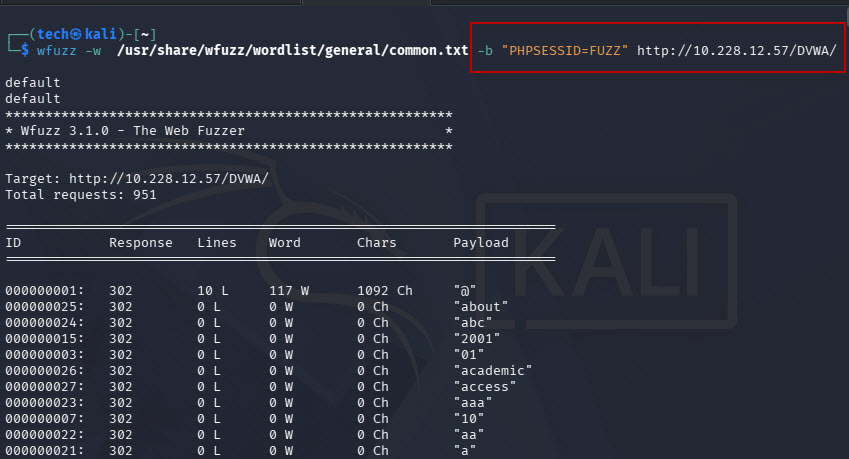
Here, -b specifies a cookie, and Wfuzz replaces FUZZ with each wordlist entry.
Cookie fuzzing can help assess how an application handles unexpected cookie values.
7. Virtual Host Discovery Using Wfuzz
Some web servers host multiple websites on the same IP address. These websites may be selected according to the HTTP Host header.
Wfuzz can test potential subdomain names by replacing the FUZZ placeholder in the header.
Syntax
wfuzz -w <wordlist> -H "Host: FUZZ.targetwebsite.com" http://target_ip/Wfuzz tests candidate hostnames such as:
- admin.targetwebsite.com
- dev.targetwebsite.com
- test.targetwebsite.com
These are examples of possible inputs, not confirmed virtual hosts.
Some web servers return the same default page for unknown hostnames, so filtering and response comparison are important.
8. Filter Results by HTTP Status Code
Wfuzz provides filtering options that make its output easier to analyze.
Show specific status codes
Use –sc to display responses matching selected HTTP status codes.
Syntax:
wfuzz -w <wordlist> --sc 200,301,302 http://targetwebsite.com/FUZZExample:
wfuzz -w /usr/share/wfuzz/wordlist/general/common.txt --sc 200,301,302 http://10.228.12.57/DVWA/FUZZ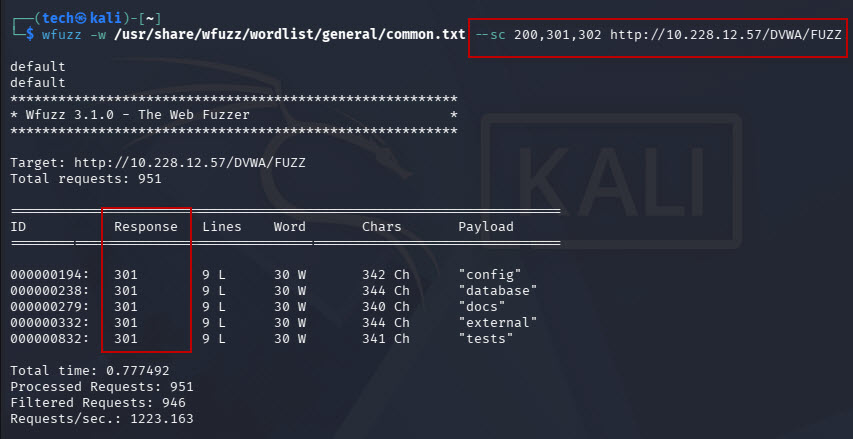
This filters results to show responses with the specified status codes:
Hide specific status codes
Use –hc to hide responses with selected status codes.
Syntax:
wfuzz -w <wordlist> --hc 404,403 http://targetwebsite.com/FUZZExample:
wfuzz -w /usr/share/wfuzz/wordlist/general/common.txt --hc 404,301 http://10.228.12.57/DVWA/FUZZ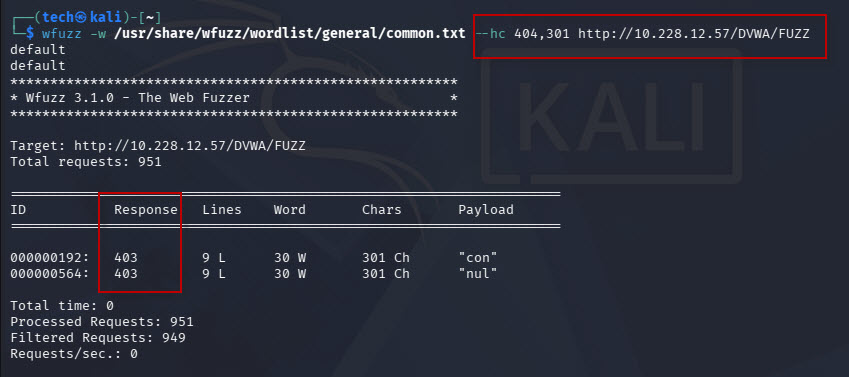
This hides responses with status codes 404 and 301.
9. Save Wfuzz Results to a File
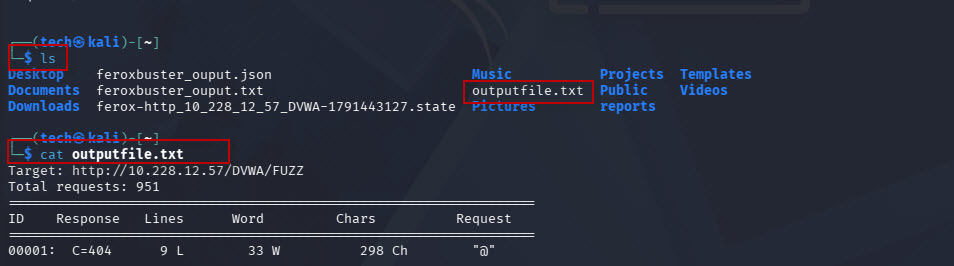
Saving results is useful when you need to review findings later, compare scans, or prepare a penetration testing report.
Syntax
wfuzz -w <wordlist> -f outputfile.txt http://targetwebsite.com/FUZZExample
wfuzz -w /usr/share/wfuzz/wordlist/general/common.txt -f outputfile.txt http://10.228.12.57/DVWA/FUZZ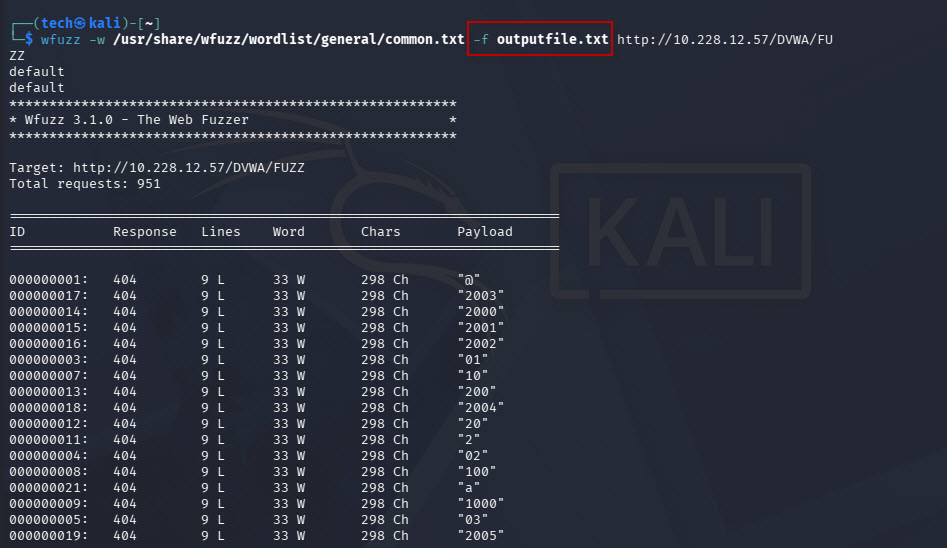
The -f option specifies an output file.
10. Generate JSON Output
JSON output is useful when you want to process scan results using scripts or integrate them into another analysis workflow.
Example
wfuzz -w /usr/share/wfuzz/wordlist/general/common.txt -o json http://10.228.12.57/DVWA/FUZZ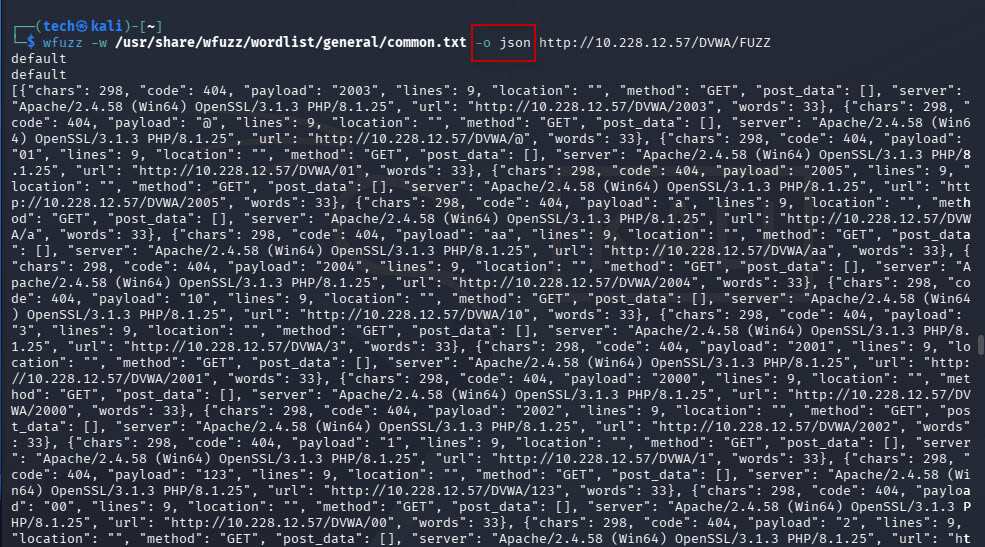
The -o json option requests JSON-formatted output.
11. File Extension Fuzzing
Some applications expose resources with extensions such as .php, .html, .txt, and .bak. Wfuzz can test combinations of file names and extensions by using two fuzzing points.
Syntax
wfuzz -c -w <wordlist> -w <extension_wordlist> http://targetwebsite.com/FUZZ.FUZ2ZExample
wfuzz -c -w /usr/share/wordlists/dirb/common.txt -w Desktop/extensions.txt --hc 404,403 http://10.228.12.57/DVWA/FUZZ.FUZ2Z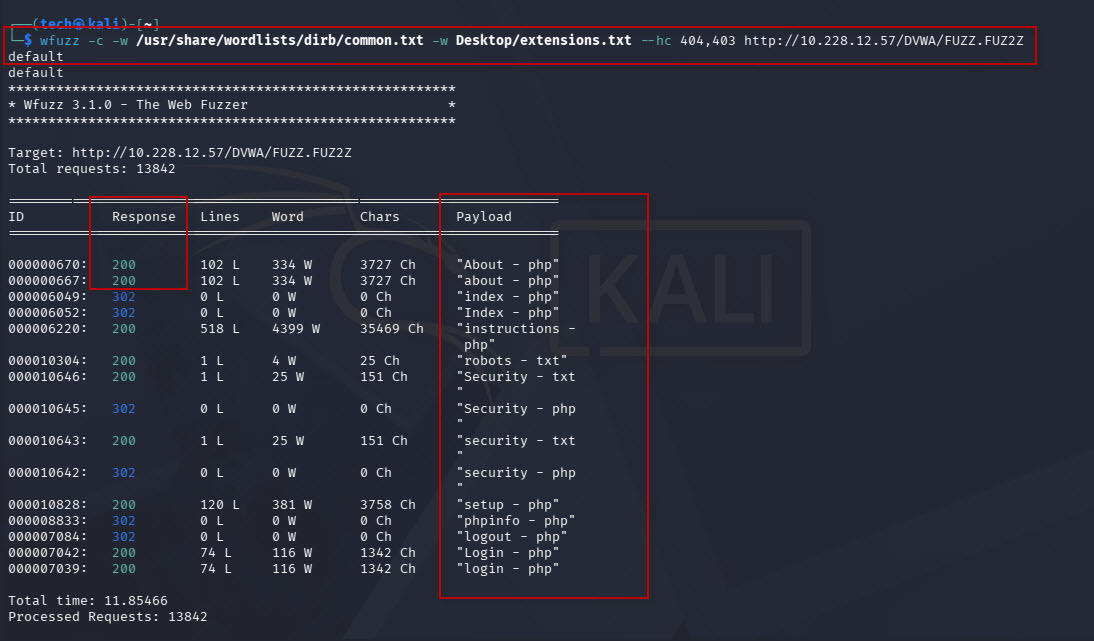
In this command:
- -c enables colored output.
- The first wordlist supplies candidate file names.
- The second wordlist supplies file extensions.
- FUZZ represents the file name.
- FUZ2Z represents the extension.
For example, Wfuzz can construct requests for names such as index.php or config.txt, depending on the entries in the wordlists.
12. POST Data Fuzzing
Web applications often accept input through HTML forms and API requests. Wfuzz can replace a value in the POST request body with entries from a wordlist.
This is useful for assessing how an authorized test application handles different input values.
Syntax
wfuzz -w <wordlist> -d "username=admin&password=FUZZ" http://targetwebsite.com/loginHere:
- -d specifies the POST request data.
- username=admin remains fixed.
- FUZZ is replaced by each entry in wordlist.
- The application receives a new POST request for each payload.
This technique can help evaluate input validation and application responses in an authorized test environment.
13. Fuzzing HTTP Headers
HTTP headers can influence how web applications process requests. Wfuzz allows you to insert wordlist entries into a selected header.
For example, to test a custom header:
wfuzz -w <wordlist> -H "X-Test: FUZZ" http://targetwebsite.com/Here, Wfuzz replaces FUZZ with each wordlist entry and sends the request with the X-Test header.
This approach can help assess how an application handles unexpected header values.
Conclusion
Wfuzz is a useful tool for web application reconnaissance and penetration testing. It supports directory and file discovery, virtual host enumeration, cookie fuzzing, HTTP header testing, POST data fuzzing, and file extension discovery.
By understanding placeholders such as FUZZ and FUZ2Z, choosing appropriate wordlists, and filtering responses effectively, security testers can investigate web applications more efficiently.
The commands covered in this tutorial provide a practical starting point for learning Wfuzz in Kali Linux 2026.2. Always validate your findings and perform testing within an authorized environment.